Matter Power Spectrum
Quick Usage
To use the package, you need add the code directory to your Python path:
from CEmulator.Emulator import Pkmm_CEmulator
Firstly, you need to create an object of the class CEmulator:
csstemu = Pkmm_CEmulator()
Note
By default, the emulator outputs results under the cosmology with single massive neutrino component if mnu != 0.
If you want to use the cosmology with three degenerate massive neutrino components, you need to set the neutrino_mass_split = 'degenerate' through:
csstemu = Pkmm_CEmulator(neutrino_mass_split='degenerate')
Then the emulator will output results under the cosmology with three degenerate massive neutrino components.
You can also obtain the matter power spectrum transfer function from single to degenerate by using Tkmm_CEmulator.
Then set the cosmologies you want to use:
csstemu.set_cosmos(Omegab=Omegab, Omegac=Omegac, H0=h0*100,
                   ns=n_s, As=A_s, w=w0,
                   wa=wa, mnu=m_nu)
All these variables can be float numbers or arrays.
Finally, you can predict the cb matter power spectrum:
zlist = np.array([0.0, 1.5, 3.0])
klist = np.logspace(-2, 1, 100)
pkcb = csstemu.get_pknl(z=zlist, k=klist, Pcb=True, lintype='Emulator', nltype='hmcode2020')
Or you can obtain the tot matter power spectrum through set Pcb=False:
pkmm = csstemu.get_pknl(z=zlist, k=klist, Pcb=False, lintype='Emulator', nltype='hmcode2020')
This output only needs numpy and scipy to run.
If you have installed the CLASS or CAMB package, you can also use directly get the results from the traditional Boltzmann code:
camb_results = csstemu.get_camb_results(z=zlist, kmax=10.0, non_linear='mead2020')
pkfunc = camb_results.get_matter_power_interpolator(nonlinear=True,
                                                   hubble_units=True, k_hunit=True,
                                                   var1='delta_nonu', var2='delta_nonu')
pkcbhm20 = pkfunc.P(zlist, klist)
pkfunc = camb_results.get_matter_power_interpolator(nonlinear=True,
                                                   hubble_units=True, k_hunit=True,
                                                   var1='delta_tot', var2='delta_tot')
pkmmhm20 = pkfunc.P(zlist, klist)
Then compare the results:
gridp = plt.GridSpec(2, 1, hspace=0.05)
with plt.style.context('article'):
   ax0 = plt.subplot(gridp[0,0])
   for iz in range(len(zlist)):
      l1, = plt.plot(klist, pkcb[iz], label=r'$z=%.0f$'%(zlist[iz]))
      l2, = plt.plot(klist, pkcbhm20[iz], 'k:', lw=2.0)
   leg1 = plt.legend([l1, l2], ['Emulator', 'HMCODE-2020'], loc=0, frameon=False)
   leg2 = plt.legend(loc=3, frameon=False)
   ax0.add_artist(leg1)
   plt.grid(True)
   plt.ylabel(r'$P_{\rm cb}(k)\, [h^{-3}\,{\rm Mpc}^3]$')
   plt.xscale('log')
   plt.yscale('log')
   plt.ylim(2e-1, 9e4)
   ax0.set_xticklabels([])
   ax1 = plt.subplot(gridp[1,0])
   for iz in range(len(zlist)):
      l1, = plt.plot(klist, pkcb[iz]/pkcbhm20[iz], label=r'$z=%.0f$'%(zlist[iz]))
   plt.ylabel(r'$P_{\rm cb}^{\rm Emu}/P_{\rm cb}^{\rm HMCODE-2020}$')
   plt.xlabel(r'$k\, [h\,{\rm Mpc}^{-1}]$')
   plt.xscale('log')
   plt.ylim(0.9401, 1.0599)
   plt.grid(True)

For further usage, please refer to the API documentation. You can also get more examples from the example notebooks.
Notebook Example
Here, we show some examples to use the Pkmm_CEmulator class in the Jupyter notebook.
Accuracy
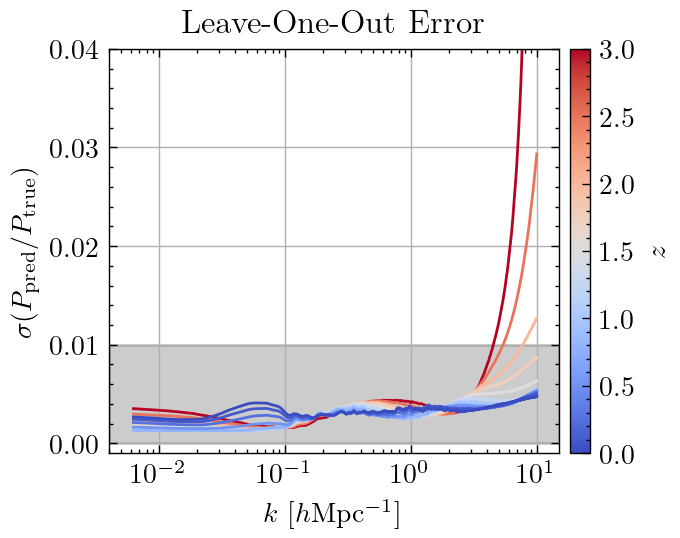
The Leave-One-Out accuracy of the emulator arcross the whole Cosmology Space is shown as followed: